What is Windows VPS and How Can It Benefit Your Business?
In today's fast-paced digital landscape, businesses are increasingly turning to technological solutions to enhance efficiency and performance. A significant option in this regard is Windows VPS (Virtual Private Server). According to a recent study by HostingAdvice, 63% of small to medium-sized businesses report using VPS to improve their IT infrastructure. This shift highlights the growing recognition of Windows VPS as a viable option for businesses aiming to optimize their operations.
Windows VPS offers dedicated resources and enhanced security features, making it an attractive choice. With a Windows VPS, companies can run applications seamlessly while maintaining control over their environments. A report from IDC indicates that businesses utilizing VPS solutions experience a 45% increase in operational efficiency, showcasing the platform's potential impact on productivity. However, not every organization maximizes these benefits. Businesses sometimes struggle with initial setup and ongoing management, which can lead to underutilization.
Ultimately, Windows VPS serves as a powerful tool for businesses looking to scale their operations. Its combination of reliability, flexibility, and cost-effectiveness makes it an increasingly popular choice. Yet, careful planning and execution are essential. Organizations must continually assess their needs and adapt their strategies to unlock the full potential of Windows VPS.

What is a Windows VPS?
A Windows VPS (Virtual Private Server) is a virtualized server that runs on the Windows operating system. Unlike shared hosting, a VPS offers dedicated resources. This allows businesses to have more control and flexibility over their server environment. According to a report by ResearchAndMarkets, the global VPS hosting market is expected to grow at a CAGR of 14.5% by 2025. This indicates a rising trend in businesses opting for VPS solutions to enhance their operations.
With a Windows VPS, users can install various software and run applications that require a Windows environment. This capability is vital for enterprises relying on Windows-based applications. Hosting providers often guarantee uptime rates of 99.9%, ensuring that your applications remain available. However, some businesses face challenges when migrating to a VPS. It’s important to assess current infrastructure and compatibility with the new server configuration.
Tip: Ensure your team is trained on managing a Windows VPS efficiently. This can prevent common pitfalls during migration. Always back up your data before making any significant changes to your server setup. Understand that while a VPS provides dedicated resources, it still requires regular maintenance and security updates to protect your business data.
Key Features of Windows VPS Hosting
Windows VPS (Virtual Private Server) hosting offers numerous key features that can greatly benefit businesses. One significant aspect is enhanced performance. According to recent industry reports, businesses using VPS solutions saw a 30% improvement in load times compared to shared hosting. This speed can directly influence customer satisfaction and retention. For businesses with high-traffic websites, this performance can be critical.
Another notable feature is scalability. VPS hosting allows companies to easily adjust their resources as needed. According to a report by Allied Market Research, 70% of organizations plan to increase their use of VPS solutions within the next five years. This flexibility enables businesses to grow without facing lengthy disruptions.
Security is another vital consideration. Windows VPS environments typically offer more robust security protocols than shared hosting. However, businesses must continuously evaluate their security measures. A study revealed that 56% of small businesses experience cyber-attacks. Companies need to actively manage their VPS security settings to protect sensitive information and maintain compliance. Regular assessments and updates are essential to ensure optimal safety.
What is Windows VPS and How Can It Benefit Your Business? - Key Features of Windows VPS Hosting
| Feature |
Description |
Benefit to Business |
| Root Access |
Full control over the server environment. |
Customize hosting settings and install software as needed. |
| Scalability |
Easily upgrade resources like RAM and CPU. |
Adapt to business growth without significant downtime. |
| Isolation |
Dedicated resources for your applications. |
Improves performance and security compared to shared hosting. |
| Cost-Effective |
Less expensive than a dedicated server. |
Affordable access to high-performance resources. |
| Windows Compatibility |
Compatible with Windows-based applications. |
Seamlessly run necessary business software. |
| Security Features |
Includes firewalls, antivirus, and backups. |
Protects sensitive business data and enhances reliability. |
Advantages of Using Windows VPS for Businesses
Windows VPS, or Virtual Private Server, is a powerful solution for businesses seeking efficiency and flexibility. It provides a dedicated virtual environment that mimics a physical server, offering the benefits of isolated resources. Each business can run its own applications without interference from others. This setup leads to improved performance and enhanced security.
One significant advantage of Windows VPS is the customization it offers. Companies can tailor their server environments to meet specific needs. This includes installing software, configuring settings, and managing resources as required. This level of control means businesses can optimize their operations effectively. Consider a growing online store. As traffic increases, the ability to adjust server resources quickly can be crucial.
**Tip:** Regularly monitor your server's performance. Unforeseen issues can arise without proper oversight. Keeping an eye on resource usage helps in anticipating and addressing performance dips.
Another benefit is cost-effectiveness. Windows VPS hosting provides a middle ground between shared hosting and dedicated servers. Businesses can enjoy advanced features without the high costs. However, it’s essential to choose the right plan. Assess your needs carefully. Opting for too much or too little can lead to wasted resources or performance problems.
**Tip:** Always start with a basic plan. You can upgrade as your business grows. This approach minimizes initial costs and allows for adjustments based on performance needs.
How to Choose the Right Windows VPS Provider
Choosing the right Windows VPS provider is crucial for your business success. Many factors influence your decision. Reliability should be your top priority. Look for providers with a proven track record in uptime and customer support. You want a host that is available 24/7 for any issues that arise.
Consider the resources offered. Assess CPU power, RAM, and storage. Your needs may vary based on business size. A small startup may need less power initially, while growing companies might require more robust options. Also, evaluate scalability; the provider should accommodate your growth without major hassles.
Price is important, but it shouldn’t be the only factor. It’s easy to be tempted by low costs. However, cheaper options may compromise service quality. Look for clear pricing without hidden fees. Reviews and testimonials can offer insights, but be cautious—some may be biased. A well-rounded choice comes from balancing all these elements.
Common Use Cases for Windows VPS in Business Operations
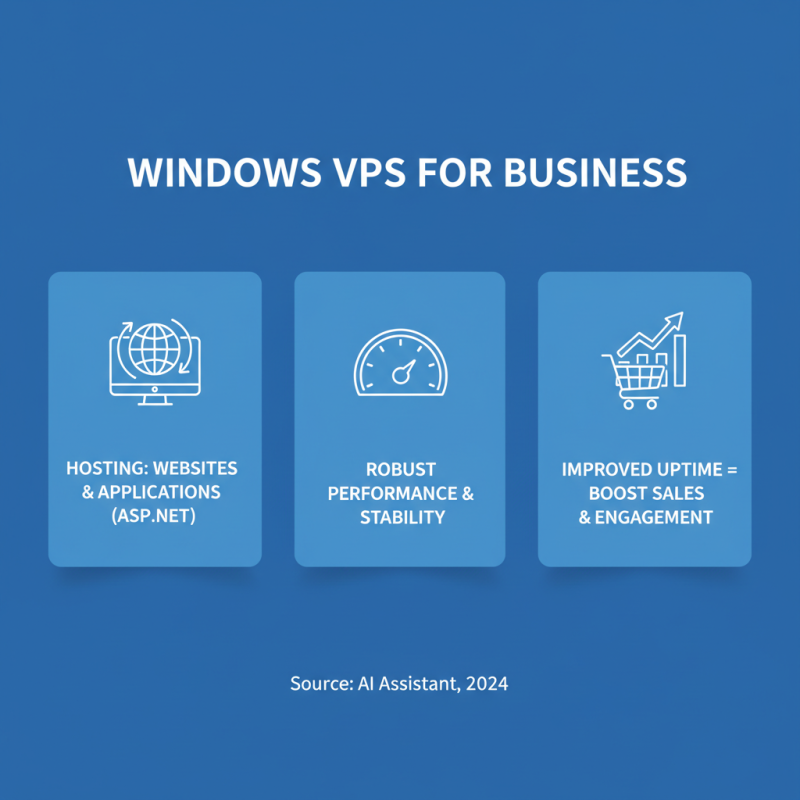
Windows VPS (Virtual Private Server) is increasingly popular among businesses for several specific use cases. One common application is hosting websites and applications. A Windows VPS offers robust performance and stability. Businesses can run their ASP.NET applications seamlessly. This allows for better customer engagement and improved website uptime, which can significantly boost sales.
Another significant use case is remote desktop services. With Windows VPS, teams can access their work environments from anywhere. This flexibility can enhance productivity. Employees can work from home or on the go, using their devices. However, it's essential to consider security aspects. Without proper configurations, data can be vulnerable to breaches.
Finally, software development and testing also benefit from Windows VPS. Developers can create isolated environments for testing applications. This minimizes risks to the main system. Yet, managing multiple environments can be complex. Occasionally, developers face issues with configuration settings and compatibility. Continuous monitoring is crucial to avoid potential problems.

 Overwhelmed? We're here to help.