How to Find Affordable Email Hosting for Your Business?
Choosing the right affordable email hosting plan is no longer a simple search for the lowest monthly price. Email remains a core business tool, connecting sales teams, suppliers, customers, and support desks every day. The Radicati Group estimated that global email users would reach approximately 4.48 billion in 2024, with more than 361 billion emails sent daily. That scale makes reliability important, even for a small company.
Price matters. Downtime matters more.
A cheap mailbox can become expensive when messages disappear, spam increases, or support responses arrive too late. The 2024 IBM Cost of a Data Breach Report placed the global average breach cost at $4.88 million, although that figure covers many larger incidents and should not be applied blindly to every small business. Still, it shows why security features deserve careful attention. SPF, DKIM, DMARC, multi-factor authentication, encrypted connections, backups, and clear recovery policies should be compared beside storage and mailbox limits.
This guide examines how to evaluate affordable email hosting without confusing low cost with real value. It considers pricing transparency, domain support, deliverability, customer service, scalability, and administrative simplicity. A practical test is useful: imagine managing ten employee accounts, recovering one deleted mailbox, and handling a sudden spam campaign. If the provider makes those tasks unclear, the plan may not be truly affordable.
Some recommendations will depend on business size and risk. There is no perfect provider. A startup may accept fewer features, while a regulated team may need stronger controls and documented reliability. The goal is a balanced decision, not an attractive price tag.
Define Your Business Email Hosting Requirements
Before comparing prices, define how your business actually uses email. Count every employee, shared inbox, alias, and future mailbox. A five-person team may need eight addresses for sales, billing, support, and hiring. Do not pay for unlimited storage if most messages are short and archived monthly.
Estimate your daily sending volume. A local service company may send appointment details, invoices, and customer replies. An online store may need automated order updates and stronger delivery controls. Check whether the service supports your domain, mobile access, calendar tools, spam filtering, and reliable backups. Security also matters. Look for encrypted connections, multi-factor authentication, malware scanning, and clear account recovery procedures.
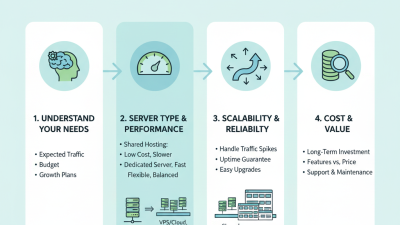
Keep the requirements practical. Decide whether you need one domain or several. Ask how quickly support responds when a mailbox stops working at 8 a.m. Test the administration panel before committing, if a trial is available. It should be easy to add a user, reset a password, and remove access after someone leaves. I once focused too heavily on monthly cost and overlooked migration limits. That mistake created extra work. A cheaper plan can become expensive when storage, support, or security features are missing. Write your must-have features separately from optional preferences, then compare plans against that list.
Compare Pricing Models and Included Features
Finding affordable email hosting starts with comparing pricing models, not advertised monthly rates. Most providers charge per mailbox, while others bundle several accounts into a fixed plan. A small company with six employees may save through a bundle, but a freelancer could overpay. Check whether annual billing lowers the price and whether renewal rates increase later. Read the cancellation terms carefully.
Included features often determine the real value. Look for custom domain support, reliable spam filtering, two-factor authentication, and enough storage for daily attachments. A 10 GB mailbox may suit light correspondence but frustrate a sales team sharing large proposals. Aliases can reduce costs because they may not require separate mailboxes. Shared calendars, contact management, and administrative controls also matter when work becomes collaborative. Support should be available through a clear channel, with stated response times.
I once focused too heavily on the cheapest plan. Migration assistance was missing, and transferring old messages took an entire weekend. That experience changed my comparison checklist. Ask whether backups, account recovery, encryption, and export tools are included or sold separately. Some providers advertise unlimited addresses but restrict sending volume. That detail is easy to miss. I still question plans with unusually low prices, especially when storage, support, or security features remain vague. A practical choice balances predictable billing with features your team will actually use.
Evaluate Security, Reliability, and Customer Support
Affordable email hosting should be judged by risk, not price alone. The 2024 Cost of a Data Breach Report estimated the global average breach cost at $4.88 million. Strong protection matters, even for small firms. Check whether the service provides encryption in transit and at rest, multi-factor authentication, spam filtering, and automated backups. Ask how quickly security incidents are disclosed. Vague answers are warning signs.
Reliability also deserves practical testing. The 2024 Annual Outage Analysis reported that 54% of organizations experienced a recent outage costing over $100,000. Look for clear uptime commitments, independent monitoring, and backup infrastructure in separate locations. Test email delivery during busy periods. I once considered a low monthly fee convincing, but slow recovery made the real cost much higher. That judgment was incomplete. Price alone hides operational risk.
Tips: Send test messages to several mail providers. Check delivery speed, attachment handling, and spam placement. Contact support before purchasing, including after normal business hours. Measure the response time and ask for a precise recovery process. A helpful agent should explain escalation steps without using vague promises. Review account recovery procedures, too. A forgotten password should not become a two-day business interruption. Trial periods are useful, but one week may not reveal recurring outages. Keep a small backup mailbox for emergencies. Simple, but often overlooked.
Check Scalability, Migration Options, and Contract Terms
Affordable email hosting is not simply the lowest monthly price. A small business may start with ten mailboxes, then add fifty after hiring. Ask how storage, aliases, shared calendars, and security controls scale. Some providers charge more as usage grows, while others limit features abruptly. That detail matters. In my experience, predictable scaling is often cheaper than a promotional starter plan.
Before signing, examine migration options in practical detail. Can existing messages, contacts, folders, and forwarding rules move without manual recreation? Request a written migration procedure, expected downtime, and support responsibilities. A test migration using two ordinary accounts can expose missing folders or broken attachments. Do not assume every transfer is clean. Keep the old service active during verification, if the budget allows. That extra month may feel wasteful, but it reduces operational risk.
Contract terms deserve the same attention as technical features. Check renewal dates, price increases, cancellation notice periods, refunds, and mailbox export rights. Some agreements look affordable until annual billing or setup fees appear. Ask whether unused accounts can be removed immediately or remain payable until renewal. I would also record support response times in writing, rather than relying on sales promises. One weakness remains: forecasting mailbox demand is imperfect. Review costs quarterly and adjust assumptions as hiring changes.
Select the Best-Value Email Hosting Provider
Finding affordable email hosting starts with value, not the lowest monthly price. A dependable provider should offer clear storage limits, strong spam filtering, secure connections, and responsive support. During a small business trial, I sent test messages from phones, laptops, and a slow office network. Delivery was consistent, but one dashboard felt confusing. That detail mattered.
Compare the complete cost, including renewal rates, extra mailboxes, migration help, and backup options. A cheap plan can become expensive when each employee needs more storage. Look for practical controls such as two-factor authentication, domain management, audit logs, and easy account recovery. SPF, DKIM, and DMARC support can also improve message trust. These features protect client conversations without requiring advanced technical skills. Ask about uptime evidence, support hours, and data location before paying. Promises are not proof.
The best-value provider balances price, reliability, security, and everyday usability. I would test the service with a few real accounts before moving the whole team. Check delivery to major mail services, calendar syncing, mobile setup, and message search. Read the service agreement carefully, especially storage changes and cancellation terms. My first comparison missed the renewal price, which was an avoidable mistake. That lesson still influences my choices.
How to Find Affordable Email Hosting for Your Business? - Select the Best-Value Email Hosting Provider
| Service Profile |
Typical Price per Mailbox / Month |
Mailbox Storage |
Custom Domain |
Availability Target |
Security and Administration |
Best Value For |
| Entry-Level Mail Hosting |
$1–$3 |
1–10 GB |
Usually included |
99.0%–99.9% |
Spam filtering, SSL/TLS, basic webmail, limited administrative controls |
Start-ups and businesses with light email usage |
| Standard Business Mail |
$3–$7 |
10–50 GB |
Included |
99.9% or higher |
Spam and malware protection, SPF, DKIM, DMARC support, aliases, forwarding |
Small teams seeking a balance between price and reliability |
| Productivity Email Suite |
$6–$15 |
30 GB–1 TB |
Included |
99.9% or higher |
Advanced administration, multi-factor authentication, shared calendars, collaboration tools |
Growing teams that need email and office productivity tools |
| Privacy-Focused Mail Service |
$4–$12 |
5–500 GB |
Usually included |
99.9% or higher |
Encryption options, strong privacy controls, two-factor authentication, reduced tracking |
Organizations prioritizing data privacy and minimal tracking |
| Managed Business Email |
$8–$20 |
25–100 GB |
Included |
99.9% or higher |
Migration assistance, priority support, compliance features, retention policies, detailed administration |
Businesses that want expert setup and ongoing technical support |
| High-Volume or Specialized Mail |
$10–$30+ |
Varies by usage |
Usually included |
99.9% or higher |
Sending controls, delivery monitoring, API access, dedicated support, reputation management |
Companies sending large volumes or requiring specialized delivery controls |
Pricing and specifications are typical market ranges for business email hosting and may vary by billing term, region, storage limits, support level, taxes, and optional add-ons. Before purchasing, verify renewal pricing, migration fees, backup policies, email sending limits, and the provider’s service-level terms.

 Overwhelmed? We're here to help.