Choosing the right storage dedicated servers is not simply a matter of selecting the largest drives or the newest processor. It requires a clear understanding of workload behavior, data growth, access frequency, and recovery expectations. A media company handling large video files needs different hardware from an online store processing thousands of small transactions. Capacity matters. So does speed.
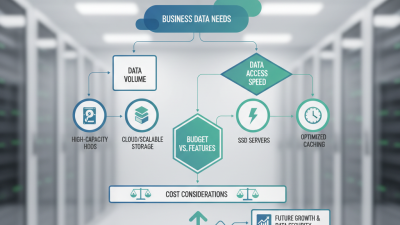
Storage analyst George Crump offers a useful principle: “The workload should determine the storage design, not the other way around.” That idea should guide every comparison. Before reviewing providers, identify whether your applications need high IOPS, strong sequential throughput, low latency, or long-term capacity. NVMe drives can deliver rapid response times, while enterprise HDDs may provide more affordable bulk storage. RAID protection, ECC memory, redundant power supplies, and remote management also deserve close attention.
Real-world testing often reveals uncomfortable details. A server may look impressive on paper but struggle during backup windows or sudden traffic spikes. Weaker network limits can quietly cancel expensive storage upgrades. Consider the physical picture: database requests arriving during business hours, backup jobs running overnight, and disks filling month by month. Then examine bandwidth, port speed, data-center location, SLA terms, monitoring, and technical support. No choice is perfect. Your estimates may be wrong. Leave room for growth, test representative workloads, and review performance after deployment. This guide explains how to compare storage dedicated servers with greater confidence and fewer costly assumptions.
Start with the workload, not the advertised disk capacity. A database needs predictable latency and high IOPS. Video archives need throughput, density, and affordable expansion. IDC’s DataSphere research projected global data creation and replication would reach 181 zettabytes in 2025. That scale makes careless capacity planning expensive. Measure daily writes, peak reads, backup windows, and expected growth for three years. Leave practical headroom. A nearly full array performs poorly.
Specify storage media by evidence. NVMe can suit transaction-heavy workloads, while enterprise hard drives may fit sequential archives. Record random IOPS, sustained throughput, latency, endurance, and queue depth. Then choose RAID or erasure protection according to recovery needs. More redundancy improves resilience, but it reduces usable capacity. It also adds rebuild time. A neat spreadsheet can still lie. Test with realistic file sizes and concurrent users before committing.
Network and recovery requirements deserve equal attention. A fast server cannot compensate for a congested uplink. Define port speed, transfer volume, failover paths, and backup destinations. The Uptime Institute’s 2024 Global Data Center Survey continues to identify power and operational resilience as critical deployment concerns. Ask for documented uptime practices, replacement procedures, monitoring, and recovery targets. Set measurable RPO and RTO values. For example, losing fifteen minutes of data is very different from losing one hour. Requirements should reflect actual business damage, not impressive specifications.

Storage choice should follow workload behavior, not capacity alone. Hard disk drives offer economical bulk storage for archives, backups, and media libraries. SATA solid-state drives reduce latency for general databases and web applications. NVMe drives deliver much higher input/output operations per second, making them suitable for analytics and transactional workloads. The difference is visible when many users request small files simultaneously.
IDC’s Data Age 2025 study projected global data creation would reach 175 zettabytes annually by 2025. That forecast highlights a capacity problem, but larger disks cannot solve every performance issue. A server holding eight terabytes may still feel slow when random access dominates. A common mistake. Measure read latency, write latency, IOPS, and sustained throughput separately.
Capacity planning should include usable space, redundancy, snapshots, and future growth. RAID can improve availability, but it may reduce usable capacity and complicate rebuilds. Uptime Institute’s 2024 Global Data Center Survey reported that 54% of respondents experienced a recent outage costing over 100,000 dollars. Storage reliability therefore deserves equal attention. Select enterprise-grade components, monitor drive health, and test recovery procedures. I would also leave expansion room, because growth estimates are often optimistic. Benchmark with your real file sizes and queue depths before ordering. Synthetic results can mislead.
Choosing a storage dedicated server begins with network performance, not attractive specifications. A high port speed means little if routes are congested. Measure latency from your users’ real locations, especially during evening traffic. Packet loss below 1% is a useful operating target, although your workload may require stricter control. The 2024 Global Data Center Survey by Uptime Institute reported that many organizations experienced outages within three years. Reliability deserves evidence, not promises. Ask for historical uptime, maintenance procedures, redundant power, and tested failover. A 10Gbps connection cannot rescue an unstable facility.
Tips: Run repeated tests from several regions. Check latency, jitter, and packet loss. Request a written service-level agreement. Verify whether backups use a separate network. Small details matter.
Data protection should cover more than disk replacement. Use encrypted connections, encrypted volumes, role-based access, and immutable backups. The 2024 Data Breach Investigations Report found that the human element appeared in 68% of breaches. Strong storage architecture still needs careful administration. Test restoration with a real file, not only a dashboard status. Keep one backup isolated from the server. Otherwise, a corrupted or encrypted primary system may affect every copy. I have seen teams overestimate their protection because backup jobs showed “successful.” That assumption needs challenging. Also examine retention periods, access logs, patch schedules, and physical security controls before signing an agreement.
Evaluate network speed, reliability, and data protection using objective technical reference points.
The reference profiles use standardized Ethernet link rates of 1, 10, and 25 Gbps, availability targets of 99.9%, 99.99%, and 99.999%, and AES-128 or AES-256 encryption options. Availability targets correspond to approximately 8.76 hours, 52.56 minutes, and 5.26 minutes of maximum downtime per year. These are planning benchmarks rather than provider-specific claims.
Choosing a storage dedicated server starts with the workload, not a flashy specification sheet. Measure file sizes, concurrent users, read/write patterns, and recovery targets. Media archives may suit large HDD arrays with economical capacity. Databases usually need SSDs with consistent latency. Check drive endurance, RAID options, hot-swap bays, ECC memory, and network throughput. More capacity is not always better. A slow rebuild can expose weak planning.
Management features determine how safely the server operates after deployment. Look for remote console access, hardware health alerts, automated backups, scheduled snapshots, and clear audit logs. A useful control panel should show temperatures, disk failures, bandwidth, and memory pressure clearly. Test reinstall and recovery procedures before production use. Do not assume a backup exists because a dashboard displays one. Restore a sample folder and record the actual time. Small tests reveal uncomfortable gaps.
Scalability means more than adding disks later. Confirm spare drive bays, supported capacity limits, PCIe expansion, power headroom, and upgrade policies. Review the provider’s replacement process and documented response times. If traffic doubles, can the network and storage controller keep pace? Plan growth stages, such as adding cache, expanding the array, or moving cold data elsewhere. I prefer measured forecasts over optimistic guesses. Still, forecasts can be wrong. Recheck usage monthly and revise the design before performance becomes an emergency.
Choosing a storage dedicated server starts with a realistic cost model, not a monthly headline price. Calculate hardware, setup, power, bandwidth, backups, monitoring, support, and possible migration fees. Separate fixed costs from usage-based charges. A server with eight high-capacity drives may look cheaper, yet replacement disks and redundant backup storage can change the result. The International Energy Agency’s Electricity 2024 report expects data-centre electricity demand to approach 1,000 TWh by 2026. Energy efficiency therefore affects long-term operating costs, even when the provider includes power in the rental fee.
Provider selection requires evidence. Compare drive types, RAID options, usable capacity, network uplink, replacement procedures, and backup locations. Ask for the actual service-level agreement, not a sales promise. The Uptime Institute’s Global Data Center Survey 2024 reported that 54% of respondents experienced an outage costing over $100,000. That figure makes resilience a financial issue, not just a technical preference. Check response times, maintenance notices, remote-hands pricing, and data-centre redundancy. My own cost sheets sometimes underestimate bandwidth growth. That is an uncomfortable gap.
Tips: Build three scenarios: normal use, rapid growth, and hardware failure. Price usable terabytes after RAID overhead. Request a 30-day traffic estimate from real workloads. Test restoration speed before moving critical data. Also, verify contract renewal terms. A low introductory rate can quietly become the most expensive line item later.
| Server Profile | CPU / RAM | Storage Configuration | Usable Capacity | Monthly Transfer | Estimated Server Lease | Backup Cost | Estimated Monthly Total | Best Fit |
|---|---|---|---|---|---|---|---|---|
| Entry-Level Archive | 8–12 cores 32 GB ECC RAM |
4 × 12 TB HDD RAID 10 |
Approximately 21.8 TB | 10 TB | US$120–180 | US$45–70 | US$165–250 | Document archives, media backups, and infrequently accessed files |
| Balanced Capacity | 12–16 cores 64 GB ECC RAM |
8 × 12 TB HDD RAID 6 |
Approximately 65.4 TB | 20 TB | US$220–320 | US$120–180 | US$340–500 | General file storage, backup repositories, and content libraries |
| High-Capacity RAID | 16–24 cores 128 GB ECC RAM |
12 × 16 TB HDD RAID 6 |
Approximately 145.5 TB | 30 TB | US$400–600 | US$260–390 | US$660–990 | Large datasets, video libraries, and high-volume backup operations |
| Hybrid Performance | 16–24 cores 128 GB ECC RAM |
8 × 12 TB HDD RAID 6 2 × 1.92 TB SSD cache |
Approximately 65.4 TB HDD 1.92 TB usable SSD cache |
30 TB | US$500–750 | US$220–330 | US$720–1,080 | Storage workloads requiring faster metadata access and frequent file retrieval |
| All-Flash Storage | 24–32 cores 128–256 GB ECC RAM |
8 × 7.68 TB enterprise SSD RAID 6 |
Approximately 46.1 TB | 40 TB | US$900–1,400 | US$180–280 | US$1,080–1,680 | Databases, virtualization, analytics, and high-IOPS applications |
| Cold-Storage Maximum | 16–24 cores 64–128 GB ECC RAM |
24 × 18 TB HDD RAID 6 |
Approximately 327.3 TB | 20 TB | US$850–1,300 | US$550–850 | US$1,400–2,150 | Long-term retention, compliance archives, and large-scale media storage |
| Planning estimates are based on typical dedicated-server rental ranges and external backup storage rates in 2025–2026. Estimated totals include the server lease and backup storage, but exclude taxes, software licenses, managed-support fees, data-center setup charges, and one-time migration costs. RAID usable capacity is approximate and assumes decimal drive capacities; RAID 6 reserves the equivalent of two drives for parity, while RAID 10 provides roughly 50% usable capacity. | ||||||||