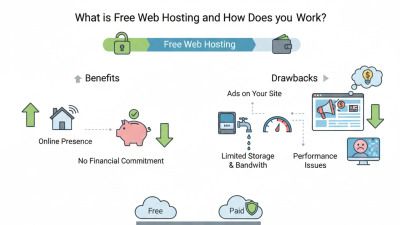
Choosing free web hosting for a business is less about finding a zero-dollar price and more about understanding what that price leaves out. A host may offer enough space for a simple landing page, yet limit storage, bandwidth, backups, or support. Those limits matter when a customer visits during a promotion or tries to contact you after hours. Free is not frictionless.
Performance has measurable consequences. Google and SOASTA’s 2017 study of mobile pages found that the probability of a visitor leaving increased by 32% as load time rose from one to three seconds. W3Techs has also reported that WordPress powers more than 43% of websites, making software compatibility a practical hosting consideration for many businesses. These figures do not prove that every free host is slow or unsuitable. They do show why testing a real page, on a real phone, is more useful than trusting a plan’s headline claims.
This guide explains how to compare free web hosting by checking uptime commitments, custom-domain support, security features, backup policies, and upgrade costs. Look closely at the details: Can you connect your own domain? Are ads placed on your pages? What happens when traffic spikes? A free account can be a sensible way to test an idea. I would not treat its performance as a verdict on a provider, though; restricted plans can distort the test. The best choice is the one that fits your current needs while offering a clear, affordable path forward.
How to Choose the Best Free Web Hosting for Your Business?
Before choosing free web hosting, define what your business needs today. A one-page service website requires less storage than an online shop with product images. List your expected pages, monthly visitors, email accounts, and security requirements. Check whether the plan includes SSL protection, backups, database access, and technical support. These details affect reliability more than attractive storage numbers.
Think about growth, not just launch costs. My first traffic estimate was too optimistic. A small campaign increased visits quickly, and the website became noticeably slower. Review resource limits, bandwidth rules, upgrade costs, and migration options. Choose hosting that lets you move your files and database easily. Test the control panel before publishing important content. It should feel clear, even during a stressful update.
Tips: Record your current page size and monthly traffic. Ask support how outages are handled. Keep independent backups. Test contact forms on a phone. Avoid uploading large images without compression. Free hosting may be useful for experiments, portfolios, or early validation, but it can create compromises. Your business may need stronger performance sooner than expected. Recheck your hosting needs every three months.

Use these Core Web Vitals thresholds as performance benchmarks when assessing hosting options. The chart compares the “needs improvement” boundary with the “poor” boundary for each metric.
Good performance targets are LCP ≤ 2.5 seconds, INP ≤ 200 milliseconds, and CLS ≤ 0.1. Consider your traffic, application requirements, and expected growth alongside these benchmarks; hosting alone does not determine site performance.
Free hosting can help a small business test a website before paying for a larger plan. Compare the actual limits, not just the advertised storage. A site with a few service pages may need little space, while product photos and downloadable files can fill a small allocation quickly. Check monthly bandwidth, file storage, database access, and the number of sites allowed. Also look for restrictions on backups, custom domains, and email accounts. These details affect daily work.
Tips: Estimate your needs before signing up. Count your pages, images, and expected visitors. Then compare those estimates with the provider’s stated limits. Check whether resource use is shared or capped, and read what happens when you exceed the allowance. Keep a copy of your site files somewhere you control.
“Unlimited” can sound reassuring, but free plans often include practical ceilings or reduced performance during busy periods. Review uptime information and support options, too; a slow page can frustrate customers even when it costs nothing. Test the setup with a simple site first. Honestly, free hosting may be enough for a basic presence, but it is not always the easiest option to grow with. A small trial can reveal limits you might otherwise miss.
Free hosting can support a small business, but performance deserves evidence, not attractive promises. Test a sample page from several locations and devices. Record time to first byte, total loading time, and failed requests during busy hours. Repeat the test on different days. Images, scripts, and shared server traffic can change results quickly. Do not judge from one afternoon.
Reliability is broader than speed. Look for a published uptime history, clear maintenance notices, and regular backup information. Check whether backups are automatic and whether restoring files costs extra. A service may show impressive availability while limiting storage, database access, or visitor volume. Read those limits carefully. A fast test can still hide weak support. I have seen testing plans focus too heavily on homepage speed and overlook broken contact forms.
Server availability also depends on infrastructure and response procedures. Check whether the server has monitoring, redundant power, and protection against common hardware failures. Free accounts may receive slower support, so test the help channel before launching. Send a practical question and measure the reply time. Set up an external uptime monitor for your website. It can reveal short outages that hosting dashboards miss. Keep a simple log of delays, errors, and maintenance periods. Your evaluation will not be perfect, but repeated evidence is more useful than a confident assumption.
Free hosting can work for a small business, but “free” does not mean risk-free. Before uploading customer details or publishing a contact form, check whether the host provides HTTPS, routine backups, malware monitoring, and clear account-access controls. Look for practical details: Can you restore yesterday’s files? Are security alerts sent by email? Vague promises are not enough. Test the dashboard, too. A confusing security page can make a simple problem harder to spot.
Support matters when a site fails during a busy week. Check the stated support hours and whether help comes through email, chat, or a searchable knowledge base. A sample response can reveal more than a polished promise. Try asking how to restore a backup. Keep expectations realistic; free plans may not include urgent, one-to-one assistance. That can be frustrating.
Consider the upgrade path before you build around a free plan. Review storage, traffic limits, custom-domain support, and the cost of moving to a paid tier. Confirm that you can export your files and database in a usable format. I learned that the hard way: a cheap-looking option can make migration awkward. Write down the limits you find, then compare them with your next year’s likely needs.
How to Choose the Best Free Web Hosting for Your Business?
A free hosting plan can help you test a business website before paying for a larger service. But choose based on what you need to test, not the word “free.” Check storage, bandwidth, security certificates, backup options, and whether the plan allows your intended use. Read the provider’s limits carefully; some services display ads or restrict custom domains. A tidy feature list does not guarantee a reliable site.
Select and Test the Best Free Hosting Provider for Your Business
Create a small test site with your key pages, such as a service description, contact form, and product photo. Test it on a phone and a desktop. Load pages during different hours, submit the form, and check whether images remain sharp. Keep notes on loading delays and errors. One quiet afternoon is not enough evidence, though it is easy to forget that.
Tips: Use a temporary site before moving real customer data. Check uptime over several days, review available support channels, and save copies of your content elsewhere. Avoid collecting sensitive information until you understand the host’s security and backup practices. Free plans can be useful, but their limits may become frustrating as traffic grows. Test with care.
| Evaluation Dimension | What to Check | Practical Acceptance Test | Why It Matters to a Business |
|---|---|---|---|
| Free-plan terms | Storage, monthly transfer, site limits, renewal conditions, and whether the plan is genuinely free. | Record every limit and confirm there is no required paid upgrade during signup or after a stated trial period. | Free plans often include restrictions; knowing them prevents unexpected costs or service interruptions. |
| Custom domain support | Whether you can connect a domain you own, use HTTPS with it, and change DNS records. | Connect a test domain or review the setup instructions. Confirm that domain registration is not being mistaken for hosting. | A business domain is easier to recognize and control than a hosting-platform subdomain. |
| HTTPS and TLS | Support for HTTPS, certificate issuance, and automatic certificate renewal. | Open the test site using HTTPS, check that the browser shows a secure connection, and verify that HTTP redirects to HTTPS. | HTTPS encrypts data in transit and is important for visitor trust and secure website connections. |
| Availability | Published uptime terms, status reporting, and the ability to monitor your own site. | Monitor the site for at least 14 days and log successful checks and outages. Treat this as an initial test, not a long-term uptime guarantee. | A short test can reveal interruptions, but it cannot establish reliable long-term availability. |
| Page performance | Load time on mobile and desktop, image handling, caching options, and response consistency. | Test the same representative page several times using a web performance tool; compare results on mobile and desktop rather than relying on one run. | Large or slow pages can make it harder for visitors to find information and complete business tasks. |
| Traffic capacity | Monthly transfer limits, request restrictions, and what happens when a limit is reached. | Estimate monthly transfer as average page size × monthly page views. Confirm the plan’s limit and any stated over-limit action. | A site that exceeds its allowance may be throttled, suspended, or prompted to upgrade, depending on the service terms. |
| Backups and recovery | Backup frequency, retention period, restore access, and whether backups are included on the free plan. | Check the plan documentation and test restoring a copy of the site where the service permits it. Keep an independent copy of important files. | A backup is useful only if the business can access it and restore the site when needed. |
| Business email | Whether email hosting is included, limited, or unavailable; check mailbox limits and domain requirements. | Verify the plan details before publishing contact information. If email is separate, confirm that the domain’s mail records can be configured. | Website hosting and business email are separate services in many plans, so email should not be assumed to be included. |
| Support and documentation | Support channels, response expectations, help articles, and community resources available to free users. | Submit a non-urgent pre-sales or setup question and note the response time and usefulness of the answer. | Clear instructions and accessible help reduce delays when configuration problems occur. |
| Data portability | Access to site files, database export options, and the steps required to move to another host. | Check whether files and data can be downloaded in standard formats and document the migration steps before building the full site. | Portability reduces dependence on one provider and makes future migration more manageable. |
| Privacy and security controls | Account security options, access controls, privacy terms, and how the service handles stored data. | Review the privacy and security documentation, use a unique password, and enable multi-factor authentication if available. | Business sites may handle personal information; review applicable legal and data-protection obligations before collecting it. |
| Overall suitability | Whether the free plan meets the site’s actual needs without relying on unverified assumptions. | Run a small pilot with a test page, domain setup, HTTPS check, performance test, and backup review before moving the business site. | A free plan can suit a prototype or small informational site, but a growing or business-critical site may need paid features and support. |
Use this checklist to compare current plan documentation and test a site directly. Limits and features can change, so verify the terms before choosing a hosting service.